Zirconia crown
AAlex L.
Stop chasing cases across scanner portals, production queues, and conversations. Bring intake, technicians, and doctors into one connected workflow.
Follow the same case across three views.
Illustrative product concept · sample data.
Follow case #1048: find the incoming scanner case, see its technician assignment, then open the doctor conversation. Switch views below to follow the handoffs.
| Case / next step | Doctor | Source | Status | Assigned to | Due |
|---|---|---|---|---|---|
| #1048 · Zirconia crownDesign | Dr. Morgan | Doctor portal | In production | Alex L. | Today |
| #1047 · Implant bridgeReview files | Dr. Patel | 3Shape | In review | Intake team | Tomorrow |
| #1046 · Full dentureFinal inspection | Dr. Chen | Analog | QC | Sam R. | Today |
| #1045 · Ceramic veneerNew intake | Dr. Reed | Medit | Submitted | Intake team | 16 Oct |
| #1044 · Implant crownAssign technician | Dr. James | DS Core | Accepted | Production team | 17 Oct |
| #1043 · 3-unit bridgeReady for dispatch | Dr. Singh | Doctor portal | Invoiced | Dispatch team | Today |
| #1042 · Night guardWith courier | Dr. Park | 3Shape | Shipped | Dispatch team | Dispatched |
Dr. Morgan · Northstar Dental Lab
I’ve uploaded the reference photos. Please review the shade details for this case.
▧ Reference photos · 3 filesThank you. The design team has the files, and your case is now in production.
Accepted → In production
Assigned to Alex L. · Design
Portal checks, missing details, unclear handoffs, and status calls all compete for your team’s attention. Explore how a connected case workflow helps.
Checking multiple scanner portals to find incoming cases and keep intake moving.
Bring cases from DS Core, 3Shape, Medit, and other portals into one case inbox. Keep digital and analog orders together.
Less portal switching. A shared view of incoming work.
Bring examples of portal checks, production handoffs, and doctor status calls to your demo. Use your current workflow to identify where LabOptIQ could make the biggest difference. Explore a time-saving hypothesis below ↓
Model time spent on portal checks and doctor status requests. Change the example inputs to explore your lab’s workload and an assumed improvement.
At an assumed 50% reduction in the selected tasks.
Monthly task time: [(portal-checking minutes × people) + (daily status requests × minutes per request)] × working days ÷ 60.
Hypothetical time freed: monthly task time × assumed reduction ÷ 100.
The default values are illustrative assumptions, not measured lab results or a savings promise. The model counts team time, assumes the two tasks do not overlap, and holds workload constant. Real improvement depends on supported connections, adoption, and the way your lab works. Validate the baseline and achievable reduction with your team.
One connected journey, with room for all the steps that make your lab yours.
Cases arrive from your scanner portals or doctor portal. Bring every digital and analog order into one place, ready for your intake team.
Dr. Morgan · Digital case
Give the people behind every restoration the context to do their best work.
See assigned work, case details, and deadlines together. Follow each internal production stage without losing sight of the case.
Assign cases, manage internal workflows, and monitor deadlines across the team. Keep every stage connected to the order.
Give doctors one place to submit, track, and collaborate. Make working with your lab feel effortless.
Submit cases and follow their progress in real time. Give clinics and doctors a clear view from submission through production to delivery.
Discuss case requirements, share files, and keep updates in context. Your doctors and lab team collaborate around the same case.
LabOptIQ is designed to coexist with your existing systems. Use the demo to review your exact tools, the information that moves between them, and the setup each connection needs.
| Your tools | The connected workflow | What to confirm in your demo |
|---|---|---|
| Scanner portalsDS Core · 3Shape · Medit | Bring scanner cases into a unified inbox alongside analog orders. | Your portals, access requirements, and the case information available through each connection. |
| Design softwareYour existing design tools | Keep production and case management connected while using your design workflow. | Supported tools, file handoffs, and where case updates happen. |
| Shipping providersYour dispatch & delivery tools | Follow cases through shipping and delivery. | Your providers, the supported connection scope, and tracking visibility. |
| Invoicing systemsYour current billing tools | Keep invoicing and financial operations connected to cases. | Supported systems, transferred information, and which tool owns the invoice. |
| Payment toolsYour existing payment setup | Keep payment tracking part of the lab’s financial workflow. | Supported payment connections and how payment status is recorded. |
Bring your software list. Review compatibility, current availability, and setup requirements for your lab’s exact systems.
See the demo agendaSimplify invoicing, track payments, and keep financial operations connected to your cases.
Understand lab performance, productivity, and turnaround times with business insights.
Your demo is a chance to assess the product and the work needed to adopt it. Review your workflows, existing cases, team, and doctor experience before deciding.
Bring the scanner portals you use and how analog orders enter the lab.
Walk through design, manufacturing, finishing, QC, and your other internal steps.
Identify who manages intake, performs production work, and communicates with doctors.
Review how LabOptIQ would coexist with your current tools and active work.
No. LabOptIQ is designed to work alongside your existing systems. Bring your design, shipping, invoicing, and payment tools to the demo so we can review the integration scope for your setup.
Yes. LabOptIQ brings digital and analog cases into one case and order workspace so your team can manage production and delivery together. Review how your analog orders are entered during the demo.
The platform brings together cases from scanner portals such as DS Core, 3Shape, and Medit. Bring the portals your lab uses to confirm current availability, transferred case information, and setup requirements.
LabOptIQ supports technician assignments and production workflow management. Bring your internal stages and handoffs to the demo to review how they map to the platform and which configuration options are available.
Discuss your active cases, case history, and current systems with the team. Confirm import options, the information that can be carried over, and how active work would be handled before agreeing on a rollout.
Doctors can submit cases, track progress in real time, share files, and collaborate with your laboratory on case details. In the demo, ask to follow a case from submission through the doctor’s view.
Ask the team to demonstrate lab and doctor access, who can view or update case information, and how shared files are handled. Review the available security documentation and data-handling details for your lab.
Use the demo to review the setup, training, and support available for your lab and doctors. Confirm the scope, timing, and responsibilities with the team before starting.
The demo is a place to discuss your requirements and request current pricing and terms. Review the implementation scope and timeline for your lab’s setup before deciding on the next step.
Explore 34 practical guides to lab software, case tracking, production, scanner files, clinic communication, and better buying decisions.
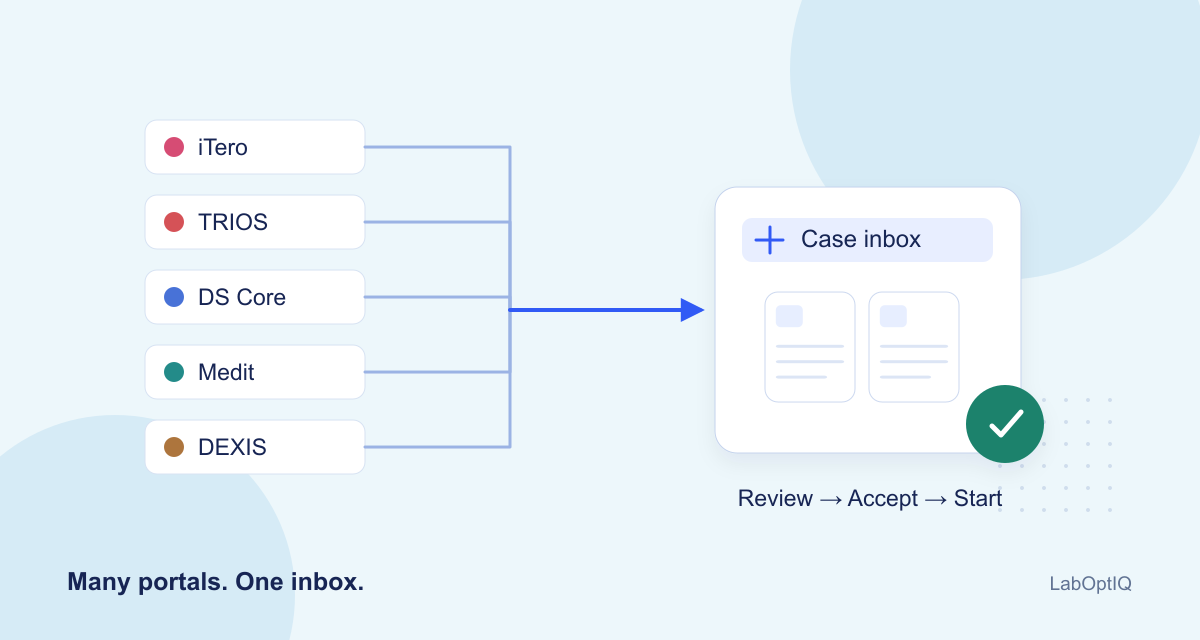
From iTero and TRIOS to DS Core, Medit, and DEXIS: a clearer starting point for cases, files, review, and the production handoff.
Read The ArticleA focused look at the work your lab needs to move—from scanner intake to production and doctor collaboration.
Explore the shared inbox and how digital and analog orders come together.
See assignments, internal production stages, deadlines, QC, and dispatch.
Review submission, live case tracking, shared files, and case conversations.
Your scanner portals, existing software, production stages, and one representative case workflow.
Discuss product fit, integration scope, onboarding, pricing, and the next step for your lab.